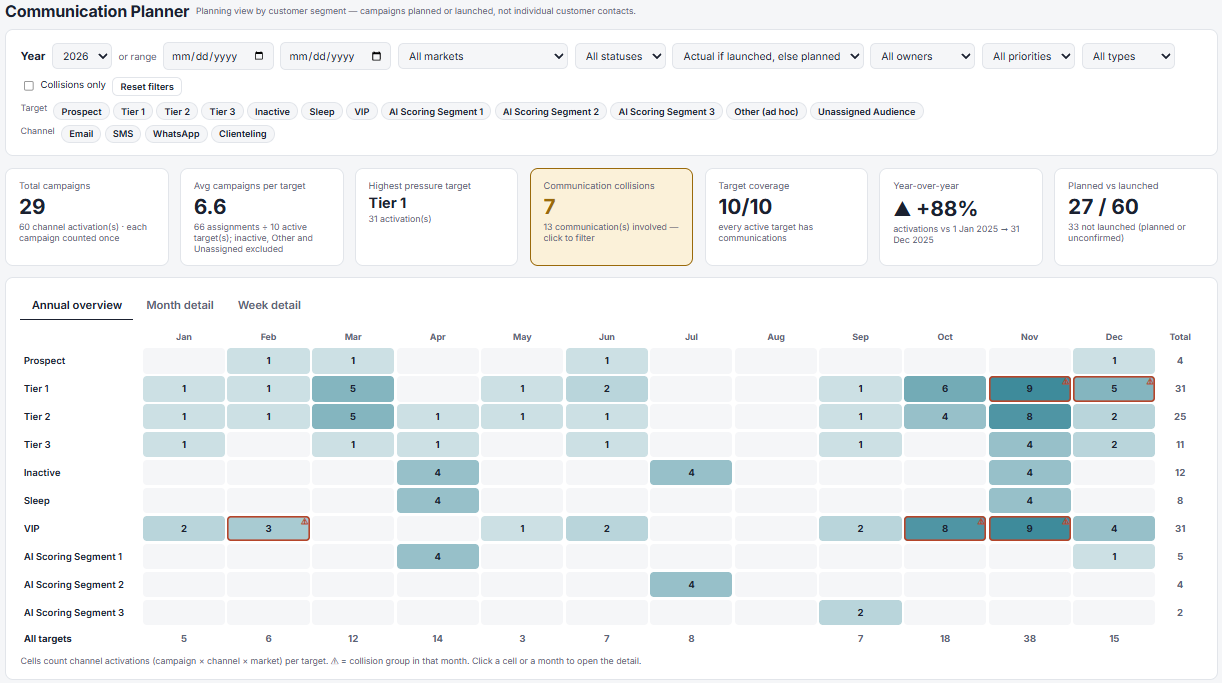

This is a continuation of my personal Campaign Management Platform project, an evolving proof of concept developed with Claude to explore practical solutions to CRM operational challenges.
From managing campaign execution to understanding communication pressure, audience coverage and potential overlaps.
What is new?
The initial objective was to bring campaign planning, execution, approvals and reporting into one workspace, providing CRM teams with greater visibility and control over their day-to-day operations.
But, while reviewing the application, I realized there was still an important perspective missing. We were looking at everything from the campaign’s point of view, but what about the customer?
A CRM Manager might have complete visibility into the upcoming campaign calendar, but that doesn’t necessarily mean they can easily understand how many communications each customer segment is expected to receive and the consistency of the storytelling behind.
For example:
- Are our VIP customers being targeted too frequently?
- Are we planning several communications for the same audience within a few days?
- Are certain customer segments receiving little attention?
- How does our communication strategy differ across Email, WhatsApp and Clienteling?
- How has our communication pressure evolved compared with last year?
These questions inspired the latest addition to the Campaign Management Platform: the Customer Communication Planner tab.
1. Bringing Target Audiences into Campaign Planning
The first step was to introduce audience targeting directly into the Campaign Brief. Each campaign can now be associated with one or multiple customer segments, such as Prospects, Tier 1, Tier 2, Tier 3, VIP, Inactive, Sleep or AI Scoring segments.
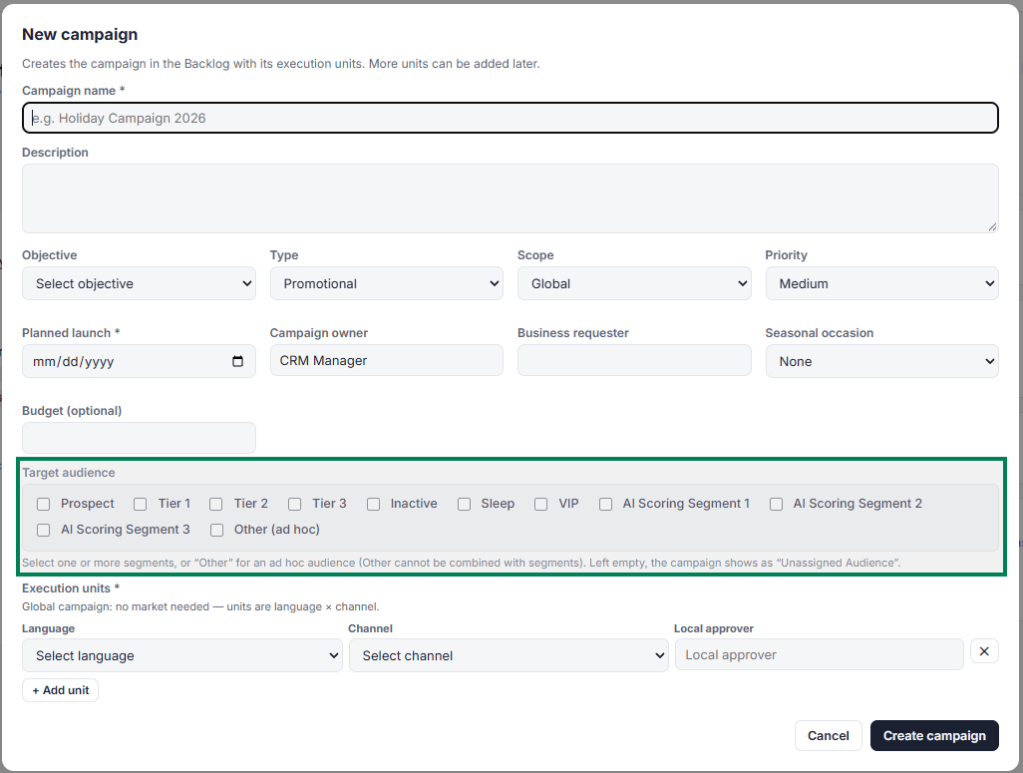
These audiences are fully configurable from the Settings tab, allowing the application to adapt to different CRM segmentation strategies.
For simplicity, the current model assumes mutually exclusive customer segments and focuses exclusively on one-off campaigns.
The idea is to connect existing campaign planning information with a clearer view of the overall communication strategy.
2. Communication Planner — Seeing the bigger picture
The new Communication Planner brings campaigns together into a customer-segment-oriented view. Instead of looking at a list of campaigns organized by launch date, it becomes possible to explore which communications are planned for each audience throughout the year.
The annual overview provides a visual representation of communication activity across segments and months, with the possibility of drilling down into specific weeks or campaigns. Filters allow users to explore different markets, channels, campaign statuses and time periods.
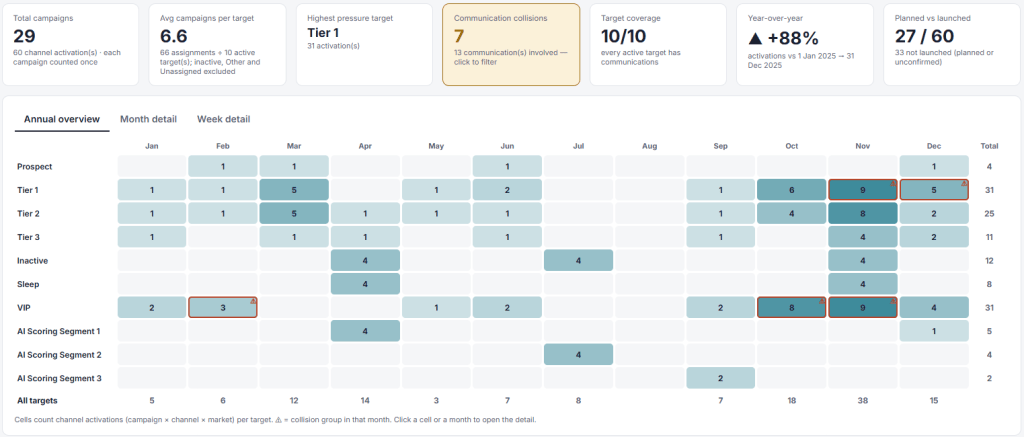
This makes it easier to identify highly concentrated communication periods, understand how campaigns are distributed across audiences and spot potential gaps in the calendar.
3. Communication Pressure — Finding potential collisions
This is probably the functionality I find most interesting from a CRM strategy point of view. In CRM, launching two campaigns successfully doesn’t necessarily mean they make sense together from the customer’s perspective.
Imagine a VIP customer segment receiving an Email campaign on Tuesday and a Clienteling communication on Thursday. Individually, both campaigns might be perfectly valid. But looking at the broader communication calendar, we might want to reconsider their timing.
That’s why I introduced the Communication Collision Detection.
By default, it identifies situations where more than one communication is planned for the same audience, in the same market, during the same calendar week, regardless of the channel. These rules can be customized in Settings, depending on the organization’s communication strategy.
Potential collisions are highlighted in the planner and can also be surfaced directly in the Campaign Brief, helping CRM Managers identify overlaps before a campaign enters production.
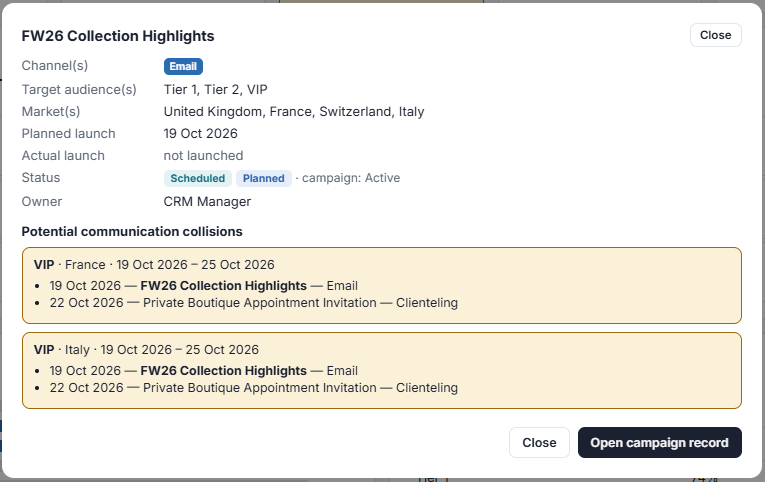
Importantly, these are informative alerts, not restrictions. The final decision always remains with the CRM team.
4. Turning Communication Planning into Actionable Insights
Beyond the visual planning interface, I wanted the new module to provide useful information for understanding and improving CRM communication strategies. The Communication Planner now includes indicators such as:
- Communication Pressure by Target: How many campaigns are directed at each customer segment?
- Channel Mix: What proportion of communications comes from Email, WhatsApp, SMS or Clienteling?
- Peak Communication Periods: Which weeks or months have the highest concentration of planned activity?
- Audience Coverage & Gaps: Which segments have planned communications, and which have none?
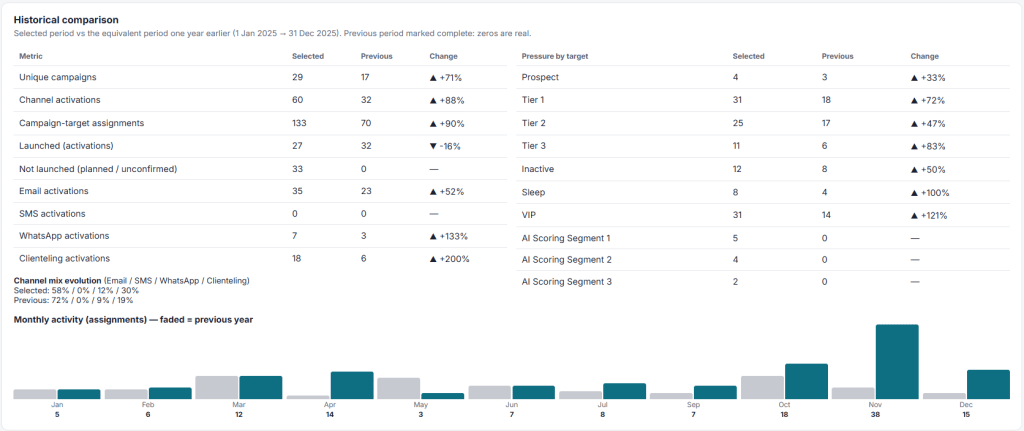
- Historical Comparisons: How have campaign volumes, channels and targeting strategies evolved year over year?
- Planned vs. Launched: How does the original communication plan compare with confirmed campaign execution?
Together, these indicators help move from simply managing a campaign calendar to evaluating the overall communication strategy.
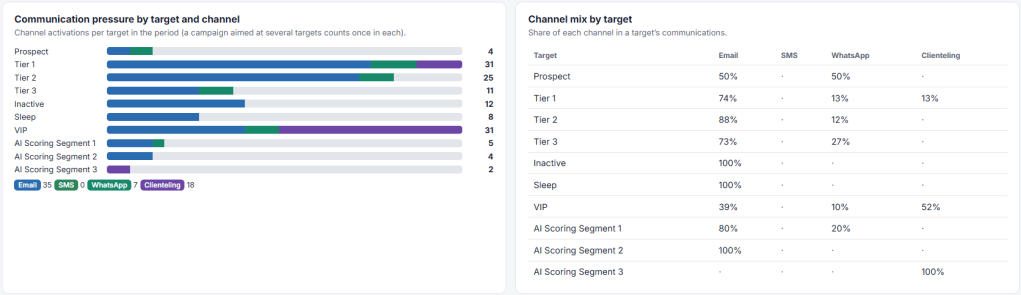
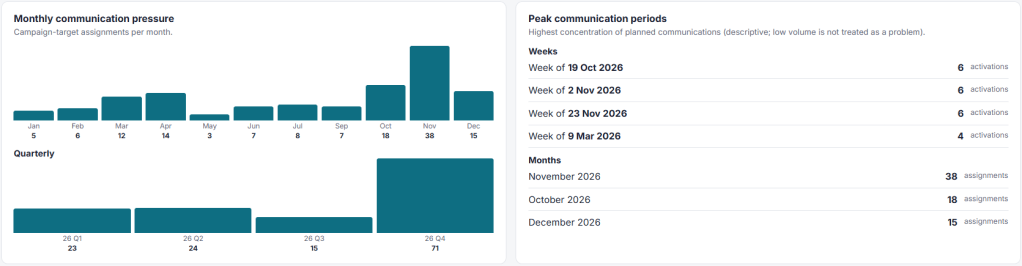
For example, an increase in Clienteling communications among VIP customers might reflect a more personalized engagement approach, while a significant concentration of Email campaigns could raise questions about communication frequency.
Of course, these metrics reflect planned campaign activity only, not actual customer-level contact frequency or purely after-send communication KPIs, since the tool isn't connected to individual customer data or sending platforms (yet).
What’s Next? — Future improvements
One of the things I enjoy most about this project is that new ideas keep emerging as I experiment with the application. The next step I’d like to explore is connecting communication planning with historical campaign performance.
Imagine being able to identify not only which audiences are being targeted and how frequently, but also which communication strategies have historically generated the best results (everthing within the same platform).
Eventually, this could support smarter audience recommendations, better campaign prioritization and more informed decisions about channel selection.
For now, the focus remains on building a practical tool that helps CRM teams gain visibility into their operations and make better planning decisions.
Final thoughts
When I started building this tool, the objective was to simplify campaign operations. With the Communication Planner, the project is gradually moving toward something broader: connecting operational efficiency with a more customer-centric approach to CRM planning.
And that’s what I find particularly interesting about AI-assisted development. Having a clear understanding of business challenges makes it possible to experiment, build and refine solutions that would otherwise remain ideas.
The project is still evolving, and I’d be happy to hear your thoughts.
How do you manage communication pressure across different customer segments and channels? Do you have a centralized view, or is this still handled through campaign calendars and spreadsheets?
Feel free to share your experience or reach out if you’d like to exchange ideas!

